
The Ultimate Guide to Build and Kill Zombies Engines: Powering Your Undead Slayer
Master the mechanics of build and kill zombies engines. Learn about rarity tiers, building tips, and how to optimize your vehicle for maximum zombie destru
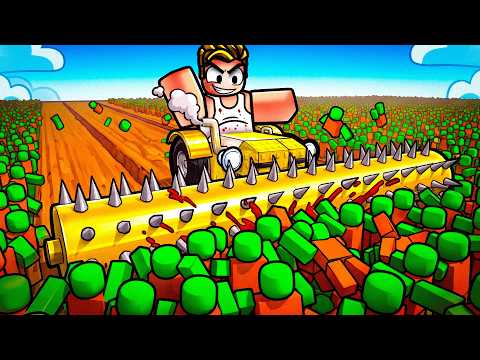 Official mediaMaster the mechanics of build and kill zombies engines. Learn about rarity tiers, building tips, and how to optimize your vehicle for maximum zombie destruYouTube
 In the high-octane world of Roblox survival games, your vehicle is your only lifeline against the endless tide of the undead. To survive the later stages of the game, you must master the art of selecting and upgrading build and kill zombies engines to ensure your car has the horsepower to plow through massive hordes. If you fail to optimize your build and kill zombies engines, you will likely find yourself stranded in a sea of monsters with a stalled chassis and no way to escape.
Understanding the Core Mechanics of Vehicle Power
At its heart, Build and Kill Zombies is a game of resource management and creative engineering. You aren't just driving a car; you are constructing a mobile fortress. The gameplay loop revolves around rolling for parts, placing them on a chassis, and testing your creation in the field. While armor and spikes are important for defense and offense, the engine is the literal heart of the machine.
Without a high-tier engine, your car will struggle to maintain momentum when hitting large groups of zombies. In this game, momentum is everything. If you slow down too much, the zombies will surround you, and your vehicle's health will deplete rapidly. Player experience suggests that prioritizing engine rolls in the early game is the most efficient way to unlock new zones quickly.
The Rarity System: From Common to Mythic
Every part you obtain through the rolling system is governed by a rarity tier. The rarity of your build and kill zombies engines determines the base stats, including torque, top speed, and fuel efficiency (or power duration). When you use the "Select Category" option in the roll menu, you can specifically target engines to improve your vehicle's performance.
| Rarity Tier | Color Code | Power Multiplier | Availability |
|---|---|---|---|
| Common | White | 1.0x | Extremely High |
| Uncommon | Green | 1.5x | High |
| Rare | Blue | 2.5x | Moderate |
| Epic | Purple | 5.0x | Low |
| Legendary | Orange | 10.0x | Very Low |
| Mythic | Red/Cyan | 25.0x+ | Extremely Rare |
As shown in the table above, the jump from Epic to Legendary is massive. Community reports indicate that a single Legendary engine can often outperform four or five Rare engines combined, making it much more space-efficient on your chassis.
How to Optimize Your Build and Kill Zombies Engines
Building a car isn't just about slapping the rarest parts onto a frame. You have to consider the weight distribution and how the power is delivered to the wheels. The build menu allows you to place parts precisely, and where you place your build and kill zombies engines can affect your center of gravity.
Targeting the Right Parts
When you are at the base, you have the option to roll for new parts using the Cash you've earned from running over zombies. Instead of rolling randomly, use the "Select Category" feature. By focusing your rolls on the "Engines" category, you increase your chances of finding that elusive Mythic power plant.
Using the Index
The game features a comprehensive Index that tracks every part you have ever unlocked. This is an essential tool for serious players. By referring to the Index, you can see the specific stat blocks for different build and kill zombies engines and decide which ones are worth keeping and which should be scrapped or replaced.
Essential Controls for New Survivors
Before you head out into the wasteland, you need to be intimately familiar with how to handle your vehicle. The controls are straightforward, but mastering them is the difference between a successful run and a total wreck.
| Action | Keybind | Description |
|---|---|---|
| Movement | W, S, A, D | Standard steering and acceleration. |
| Jump | Spacebar | Useful for clearing small obstacles or escaping traps. |
| Interact | E | Used for building and interacting with base beacons. |
| Drive / Base | F | Toggle driving mode or instantly return to safety. |
Remember that the "F" key is your emergency button. If your car is flipping over or you are about to be overwhelmed, returning to base can save your progress and allow you to spend your earned Cash on even better build and kill zombies engines.
Building for the Long Haul: Presets vs. Custom Designs
For players who are just starting out, the game offers a "Car Builds" beacon. This area provides premade car presets that serve as a baseline. While these builds are rarely "optimal" for end-game play, they provide a balanced starting point.
The Benefits of Presets
- Ease of Use: If you have the required parts in your inventory, you can assemble a functional car in seconds.
- Balance: Presets usually have a good power-to-weight ratio.
- Inspiration: You can see how the developers intended parts to be used, which helps when you start designing your own custom rigs.
The Power of Customization
Once you have collected several high-tier build and kill zombies engines, you should move away from presets. Custom builds allow you to stack engines in ways the presets don't allow. Advanced players often build "engine towers" or hidden power compartments to protect their most valuable parts from zombie damage. You can find more advanced building tips on the official Roblox platform, where the community frequently shares their most creative designs.
Cooperative Play and Shared Engineering
Build and Kill Zombies is not a solitary experience. The game features a robust co-op system that allows players on the same server to work together. This is particularly useful when it comes to vehicle construction.
- Shared Building: Two players can contribute parts to a single vehicle chassis. This allows one player to focus on rolling for high-end armor while the other focuses on rolling for the best build and kill zombies engines.
- Multi-Passenger Driving: One player can drive while the other manages defensive abilities or simply enjoys the ride.
- Resource Pooling: By working together, you can clear zones much faster, leading to a higher Cash-per-hour rate for everyone involved.
Progression Strategy: Zone by Zone
The game world is divided into multiple zones, each with tougher zombies and higher rewards. Your progression is gated by the strength of your vehicle.
| Zone | Recommended Engine Tier | Primary Threat |
|---|---|---|
| Zone 1 | Common / Uncommon | Basic Walkers |
| Zone 2 | Rare | Fast Runners |
| Zone 3 | Epic | Armored Zombies |
| Zone 4 | Legendary | Giants / Hordes |
| Zone 5+ | Mythic | Boss Entities |
In the early zones, you can get away with a basic setup. However, by the time you reach Zone 3, the weight of the armored zombies will bring a weak car to a dead stop. This is where the torque of high-quality build and kill zombies engines becomes mandatory. Community reports suggest that if you find yourself getting "stuck" on groups of zombies, it is a sign that you need to return to base and roll for a more powerful engine rather than adding more weapons.
Tips for Optimal Driving Performance
While the guide notes that building is more important than driving, you still need to be smart behind the wheel.
- Avoid the Dense Center: When entering a new field, don't drive straight into the middle of the largest horde. Work the edges to build up speed.
- Use Ramps: Ramps are scattered throughout the map. Jumping not only helps you avoid damage but can also help you bypass dense clusters of enemies that would otherwise slow you down.
- Maneuver through Gaps: The game physics allow you to slip through gaps in the undead line. If your build and kill zombies engines are struggling, look for the path of least resistance.
- Watch the Health Bar: Your chassis has a limited amount of durability. Even the best engine won't help if your wheels fall off.
The Importance of the Build Menu
The Build menu is where the magic happens. When you enter this mode, the game world pauses or protects you, allowing you to fine-tune your machine. You can see the stats of each part, including how much weight an engine adds versus how much power it contributes.
A common mistake among new players is adding too many heavy parts (like thick steel plates) without upgrading their build and kill zombies engines first. This leads to a "tank" that can't actually move. Always ensure your power output exceeds your total vehicle weight by at least a 2:1 ratio for optimal handling.
Frequently Asked Questions
What are the best build and kill zombies engines for beginners?
For beginners, the best engines are anything in the Uncommon (Green) or Rare (Blue) tiers. While you start with Common parts, you should aim to replace them as soon as you earn your first 1,000 Cash. Focus your rolls specifically on the "Engine" category to get these upgrades quickly.
How do I get more Cash to roll for engines?
Cash is earned by killing zombies. The more zombies you run over in a single run, the more Cash you accumulate. To maximize your earnings, try to stay in the field as long as possible before returning to base. Upgrading your build and kill zombies engines allows you to stay out longer and reach higher-value targets.
Can I lose my engines if my car is destroyed?
No, you do not lose your parts permanently. If your vehicle is destroyed or you choose to return to base, your parts are returned to your inventory. This allows you to experiment with different configurations of build and kill zombies engines without the fear of losing your hard-earned Mythic rolls.
Does adding more engines always make the car faster?
Not necessarily. Adding more build and kill zombies engines increases your power, but it also increases the weight of the vehicle. There is a point of diminishing returns where the added weight of an extra engine slows the car down more than the extra power speeds it up. Always check your top speed stats in the build menu after adding a new part.
Related Guides
How to Build and Kill Zombies Fuel and Vehicle Upgrades: September 2026 Guide
Master your mechanics in Roblox! Learn how to manage your build and kill zombies fuel, upgrade your engine, and redeem the latest codes for free rewards.
How to Build and Kill Zombies Supports: Master Your Vehicle for Maximum Destruction
Learn how to optimize your vehicle in Roblox by mastering how to build and kill zombies supports effectively. Level up your ride today!
Mastering Build and Kill Zombies Blocks: The Ultimate Guide to Vehicle Construction and Defense
Learn how to optimize your vehicle using Build and Kill Zombies blocks. Explore stats, building strategies, and tips for the 2026 Hacker Event.
Mastering Build and Kill Zombies Wheels: The Ultimate Guide to Vehicle Parts and Survival
Learn how to optimize your build and kill zombies wheels for maximum survival. Discover wheel stats, upgrade paths, and pro building strategies.