
Mastering the Build and Kill Zombies Controls: A Complete Beginner’s Guide
Learn everything about the Build and Kill Zombies controls, how to upgrade your vehicle, and tips for dominating the undead in this comprehensive guide.
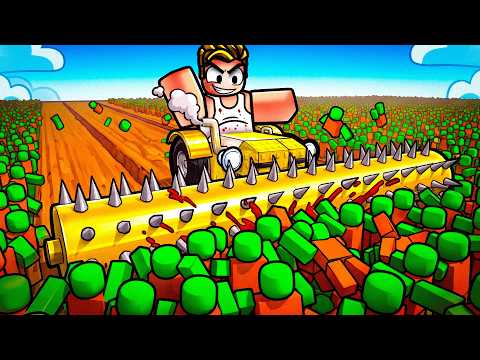 Official mediaLearn everything about the Build and Kill Zombies controls, how to upgrade your vehicle, and tips for dominating the undead in this comprehensive guide.YouTube
 Introduction to Zombie Survival
If you are diving into the high-octane world of Roblox’s latest hit, understanding the build and kill zombies controls is your first step toward survival. Mastering these inputs is essential because your ability to navigate the field efficiently directly determines your success in clearing waves of the undead. Whether you are a newcomer or just looking to refine your strategy, getting comfortable with the build and kill zombies controls will give you the edge needed to build the ultimate zombie-crushing machine.
Essential Controls for Every Survivor
Success in this game hinges on your ability to maneuver both on foot and behind the wheel. The control scheme is intuitive, but knowing exactly which keys trigger specific actions can save you precious seconds when the horde is closing in.
Basic Movement and Interaction Table
| Action | Key Input | Purpose |
|---|---|---|
| Movement | W, A, S, D | Navigate the map and base area |
| Jump | Spacebar | Clear obstacles or jump over gaps |
| Interact | E | Use menus, beacons, and workstations |
| Drive | F | Enter your vehicle or return to base |
Beyond these basics, players should note that the interaction key (E) is the most versatile input. You will use it to access the Build menu, interact with car presets, and manage your inventory of parts.
Building Your Ultimate Zombie-Hunting Machine
The core loop of the game revolves around engineering the perfect vehicle. You don’t just drive; you build. By collecting parts through rolls, you can customize your chassis to handle different terrains and zombie densities.
Part Rarity and Performance
Understanding the hierarchy of parts is crucial for long-term progression. Higher rarity items provide significant stat boosts, making your vehicle faster, more durable, and more lethal against the undead.
| Rarity Tier | Drop Frequency | Power Level |
|---|---|---|
| Common | Very High | Baseline |
| Uncommon | High | Moderate |
| Rare | Medium | Enhanced |
| Epic | Low | Strong |
| Legendary | Very Low | Elite |
| Mythic | Extremely Low | Ultimate |
According to community reports, the best strategy for beginners is to prioritize engine upgrades early on. While armor might seem tempting, speed is often the best defense when navigating the dense gaps between waves of zombies.
Strategic Gameplay Tips
Efficiency is the name of the game. You want to spend as little time as possible in the base and as much time as possible out in the field racking up Cash.
- Use Car Presets: Don't feel pressured to build from scratch every time. Use the "Car Builds" beacon to load up reliable, pre-made designs. These serve as excellent baselines that you can tweak later.
- Master the Maneuvers: You don't always have to hit the zombies head-on. The game rewards smart driving. Use your movement keys to weave through the horde rather than colliding with them, which preserves your vehicle's health.
- Co-op Coordination: If you are playing with friends, assign roles. One player can focus on building and optimizing the vehicle, while the other handles the driving and combat maneuvers.
Advanced Vehicle Optimization
Once you have the hang of the build and kill zombies controls, it is time to look at the Index. The Index is your best friend for tracking which parts you have unlocked. By constantly checking this, you can see which categories are lacking and adjust your rolling strategy accordingly.
Recommended Upgrade Path
| Phase | Focus Area | Goal |
|---|---|---|
| Early Game | Engine & Tires | Increase speed to escape early waves |
| Mid Game | Chassis Weight | Improve stability for better handling |
| Late Game | Weapons/Spikes | Maximize damage output per collision |
The Role of Community and Social Play
Many players find that the best way to improve is by joining the official Roblox community or associated fan community channels. Engaging with others allows you to share designs, discuss the latest meta-builds, and find partners for co-op sessions.
Community reports suggest that players who actively participate in these groups often find rare parts faster because they share tips on which "Select Category" rolls are currently yielding the best results.
Frequently Asked Questions
What are the primary build and kill zombies controls I need to know?
The most important controls are W, A, S, and D for movement, the Spacebar for jumping, E for interacting with the build menu, and F for driving or returning to base.
Is it necessary to build a new car every time I play?
No, you can utilize the "Car Builds" beacon to access presets. This allows you to assemble a functional vehicle quickly without starting from zero, provided you have the required parts.
Can I play this game with friends?
Yes, this is a co-op-friendly experience. You and your friends can join the same server to build vehicles together or drive out into the field as a team to maximize your zombie-killing efficiency.
How do I get more powerful parts?
You can unlock parts by using the "Select Category" feature and performing rolls. The rarity of the part determines its power, with Mythic items providing the highest performance boosts for your vehicle.
Related Guides
Build and Kill Zombies Beginner Guide: How to Construct the Ultimate Undead Smasher
Master the apocalypse with our Build and Kill Zombies beginner guide. Learn about part rarities, skill upgrades, and car construction to survive.
Build and Kill Zombies Tips and Tricks: The Ultimate Guide to Surviving the Horde
Master the art of vehicle construction in Roblox with these Build and Kill Zombies tips and tricks. Learn to roll for parts and maximize your cash flow.
Build and Kill Zombies: How to Play and Survive the Apocalypse in Roblox
Master the undead with our ultimate guide on how to play Build and Kill Zombies. Learn to build your death machine, upgrade weapons, and survive the waves.
The Ultimate Build and Kill Zombies Cash Farming Guide: Maximize Your Profits
Master the roads with our comprehensive Build and Kill Zombies cash farming guide. Learn the best routes, boss strategies, and tips to upgrade your car fas